Comparators
We can use custom Comparator<Object> to sort Collections.
class Student {
    String name;
    int grade;

    public Student(String name, int grade) {
        this.name = name;
        this.grade = grade;
    }
	//override toString() for output
}

class StudentComparatorLength implements Comparator<Student> {
  @Override public int compare(Student s1, Student s2){
      return s1.name.length() - s2.name.length();
  }
}

Comparator<Student> htc = new StudentComparatorLength();
Set<Student> scores = new TreeSet<>(htc);
Because our comparator uses string length, this leads to unwanted outputs.
In this example, as we have a TreeSet inserting first Tom then Tim will only add Tom as they are the same element according to the comparator (same length so compare returns 0 which is the code for equals).
Comparable
The Comparable interface implements the “natural ordering” of this type. See Sort on Custom Class (Comparable).
Sets
We can generate the hashCode automatically in IntelliJ when creating a custom type we want a HashSet or HashMap of (Right-Click on Class > Generate > hashCode).
Iterators and Remove
In a for-each loop, elements are read only:
for (Double grade : grades.keySet()) {
	grades.remove(grade); // Runtime error ConcurrentModification as read-only
}
To do this correctly, we can use the Iterator interface functionality:
Iterator<String> it = arrayList.iterator();
while(it.hasNext()) {
	it.next();
	it.remove();
}
remove() deletes the last seen element from the iterated collection. Note that we are only allowed to call remove() after calling .next().
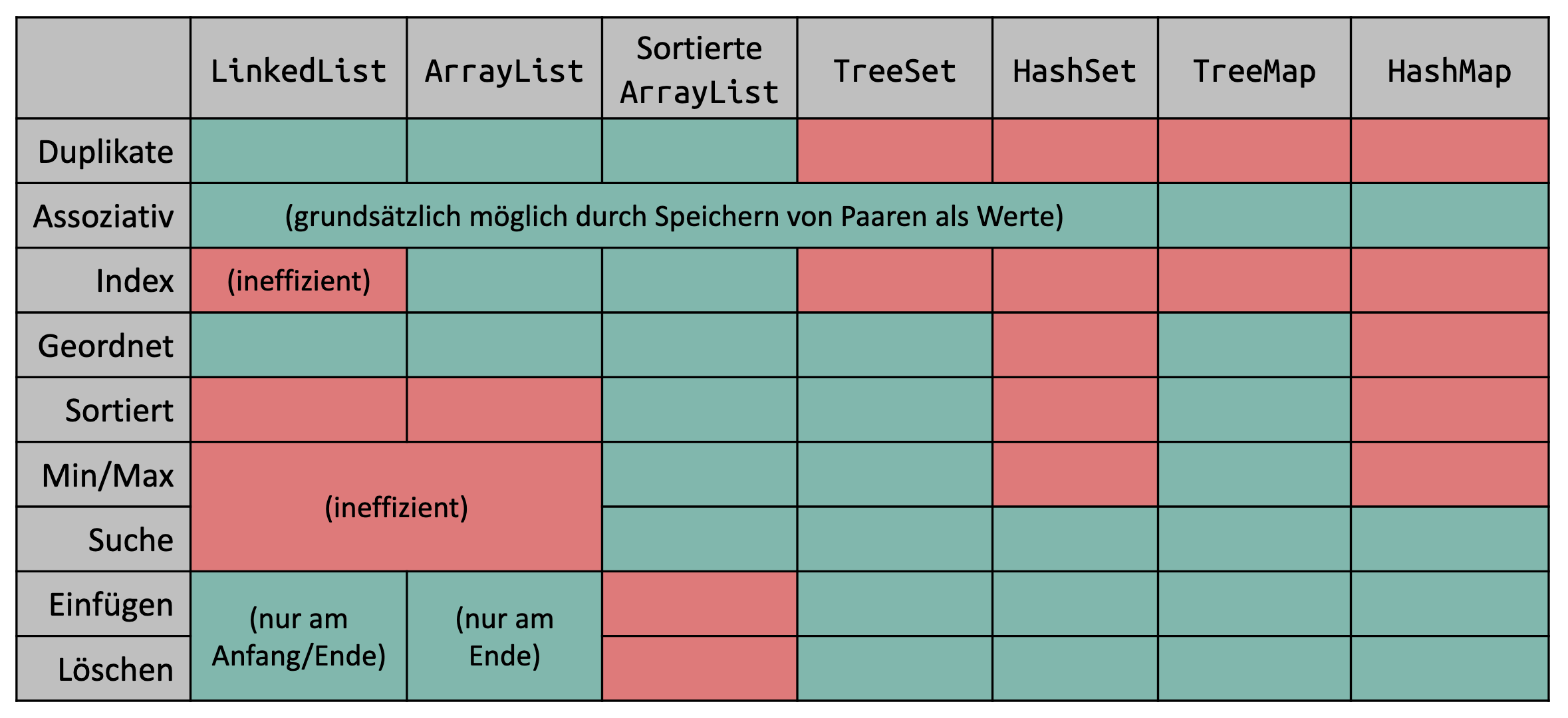
Cheatsheet