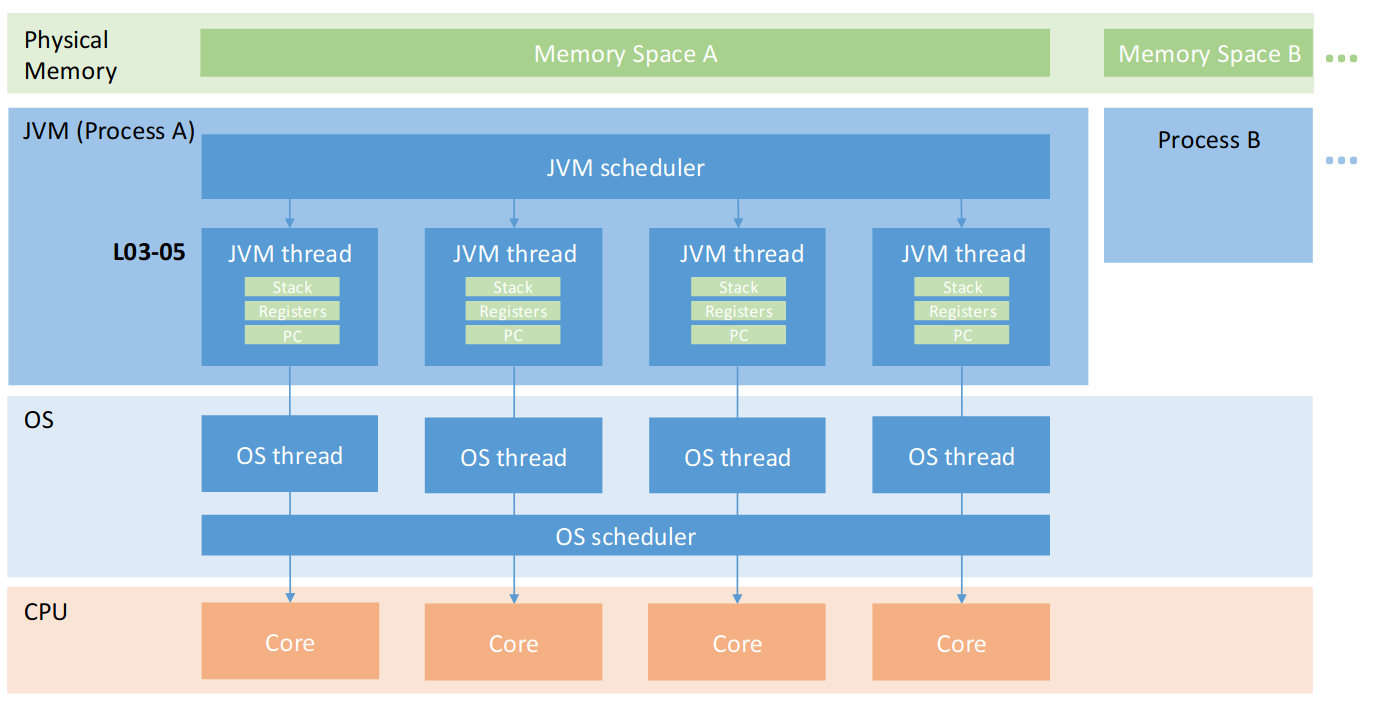
2.1 Processes
2.2.1 Process
Process
A process is essentially a program executing inside an OS.
Each running instance of a program (browser windows, etc…) is a separate one.
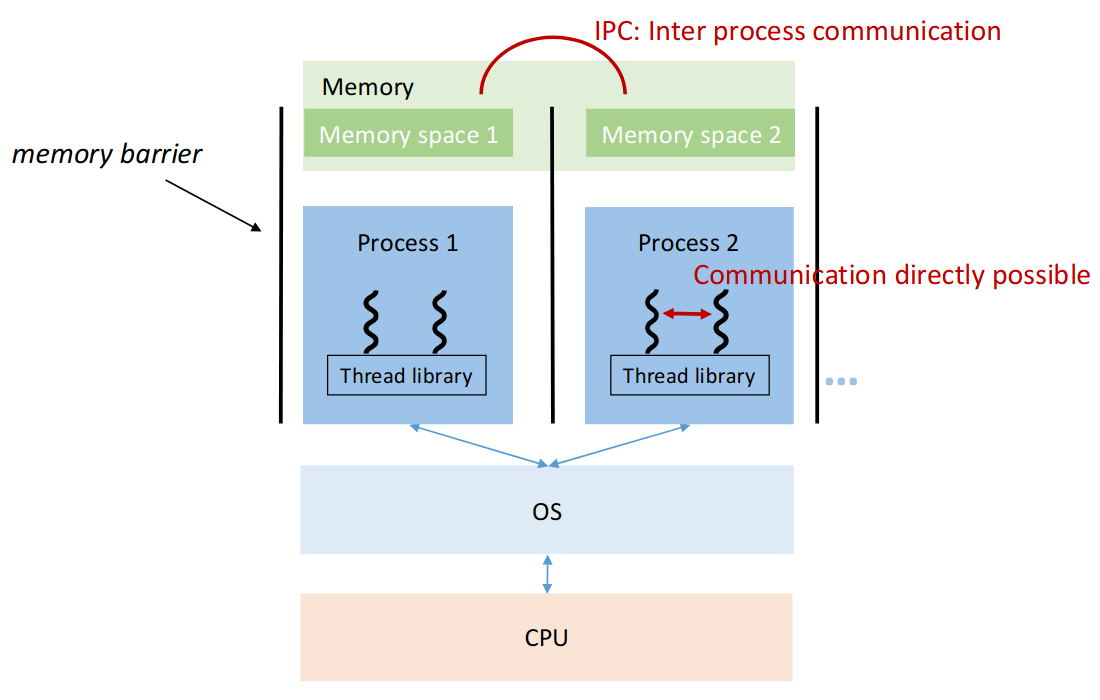
Processes share CPU, but each has their own memory space.
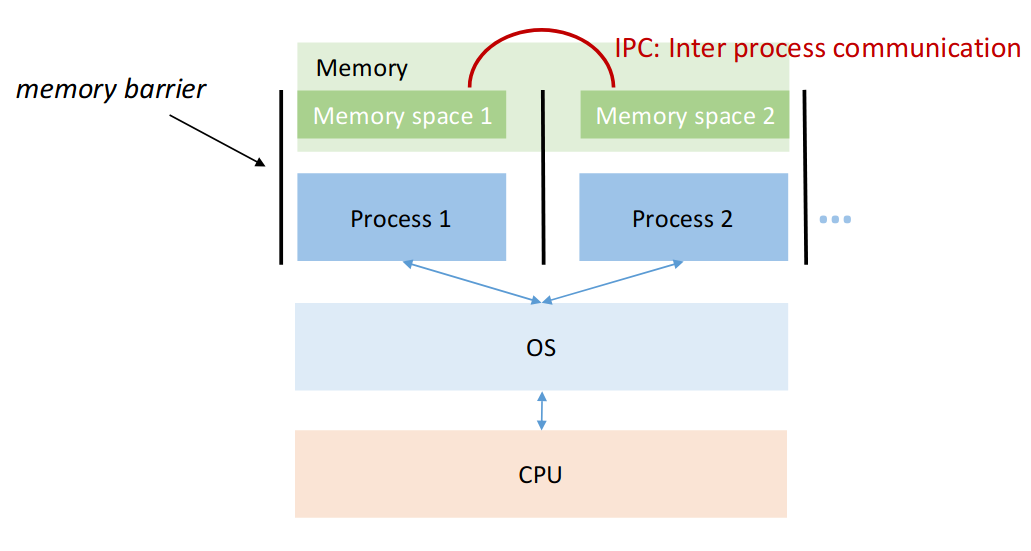
Due to this memory isolation, each process has their own context, which is:
- hardware context (instruction counter, CPU regs, execution state)
- Memory Context (virtual memory, stack, heap)
- OS-level context (PID, open files)
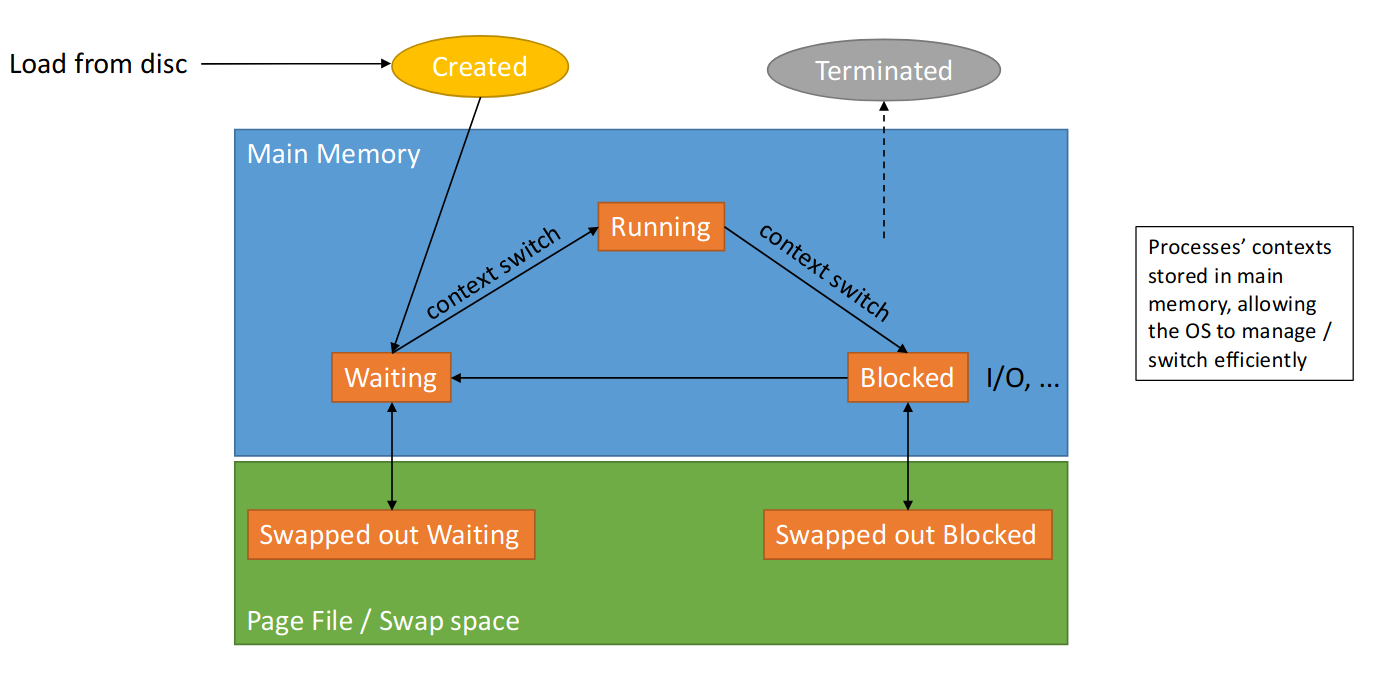
During the lifetime of the process, we often have to load it into and from memory, which incurs high costs.
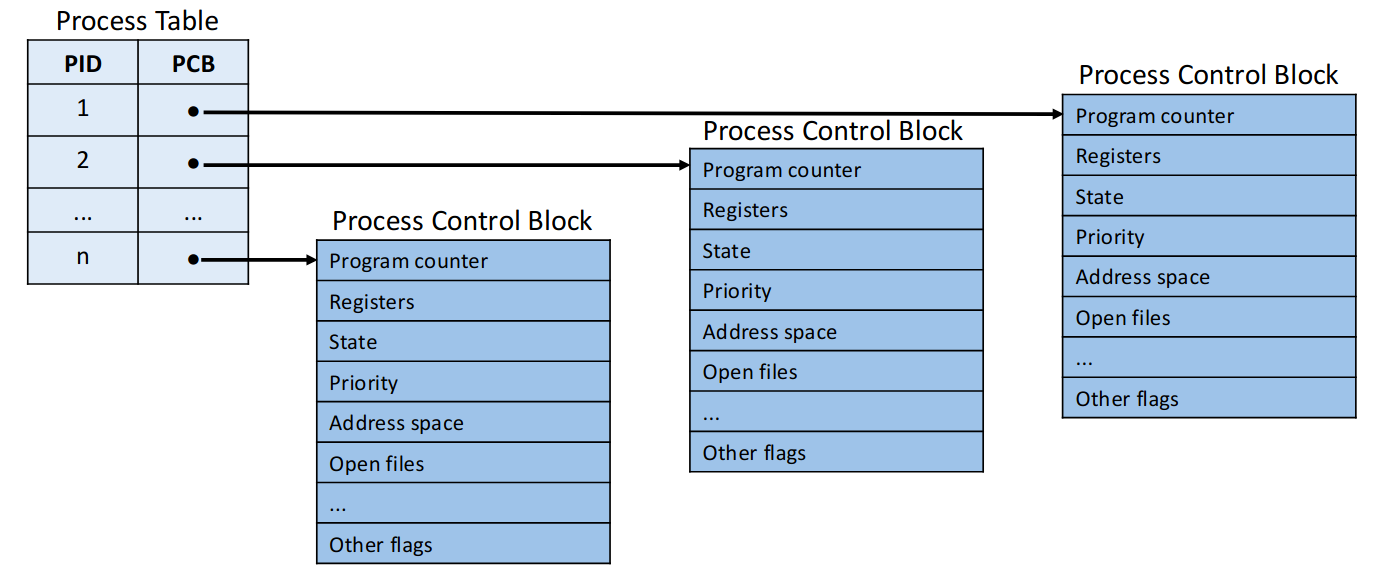
The data about a process is stored in a process control block.
2.1.2 OS
The OS:
- starts processes
- terminates them (free ressources)
- controls ressource usage
- Schedules CPU time
- Synchronises processes
- Allows for IPC (inter process communication)
The OS scheduler handles overall task management (multitasking). There are different types of schedulers - one ist the CPU Scheduler. It determines which one gets CPU time next:
- processes arrive
- picks one to run
- runs for a while
- OS switches to another process
This leads to efficient utilisation, fair sharing. It incurs process context switching costs though.
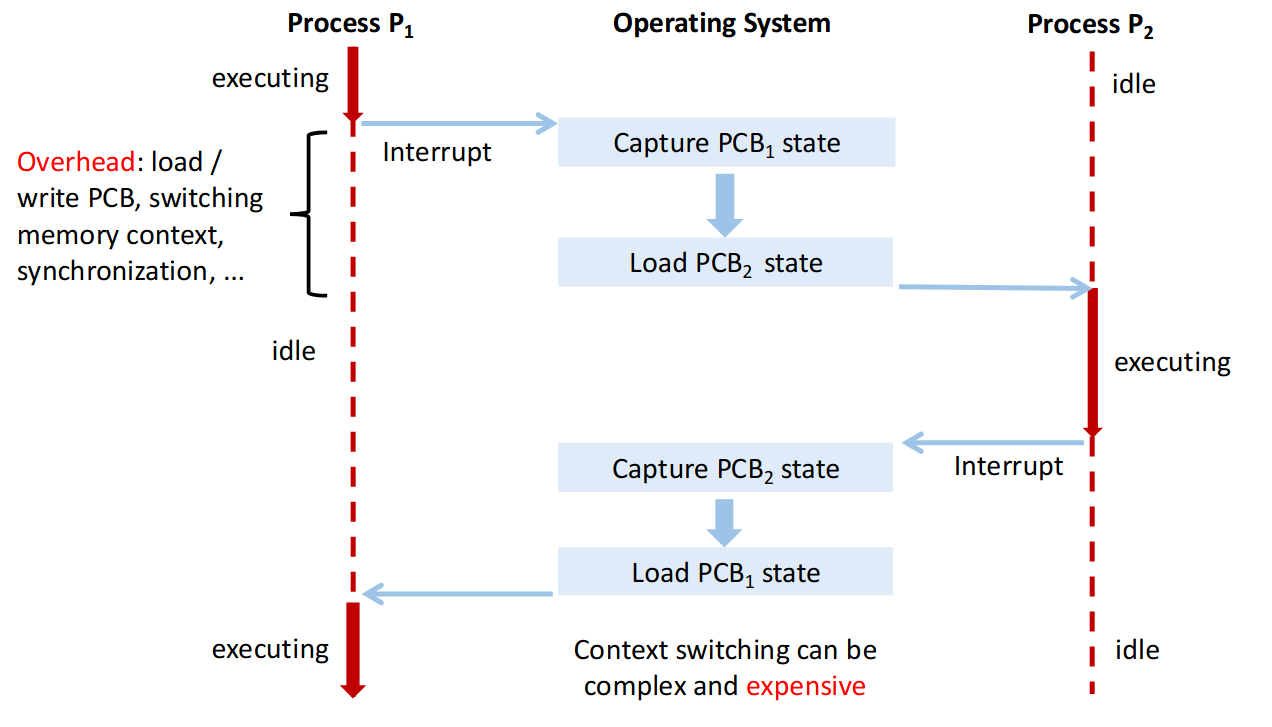
As you can see, process switching is quite ressource intensive, since it takes time to load things from RAM (and especially from the swap file).
The context switch overhead is the extra cost of switching which one is executed (large for processes, small for threads).
2.1.3 Processes on a single-core CPU
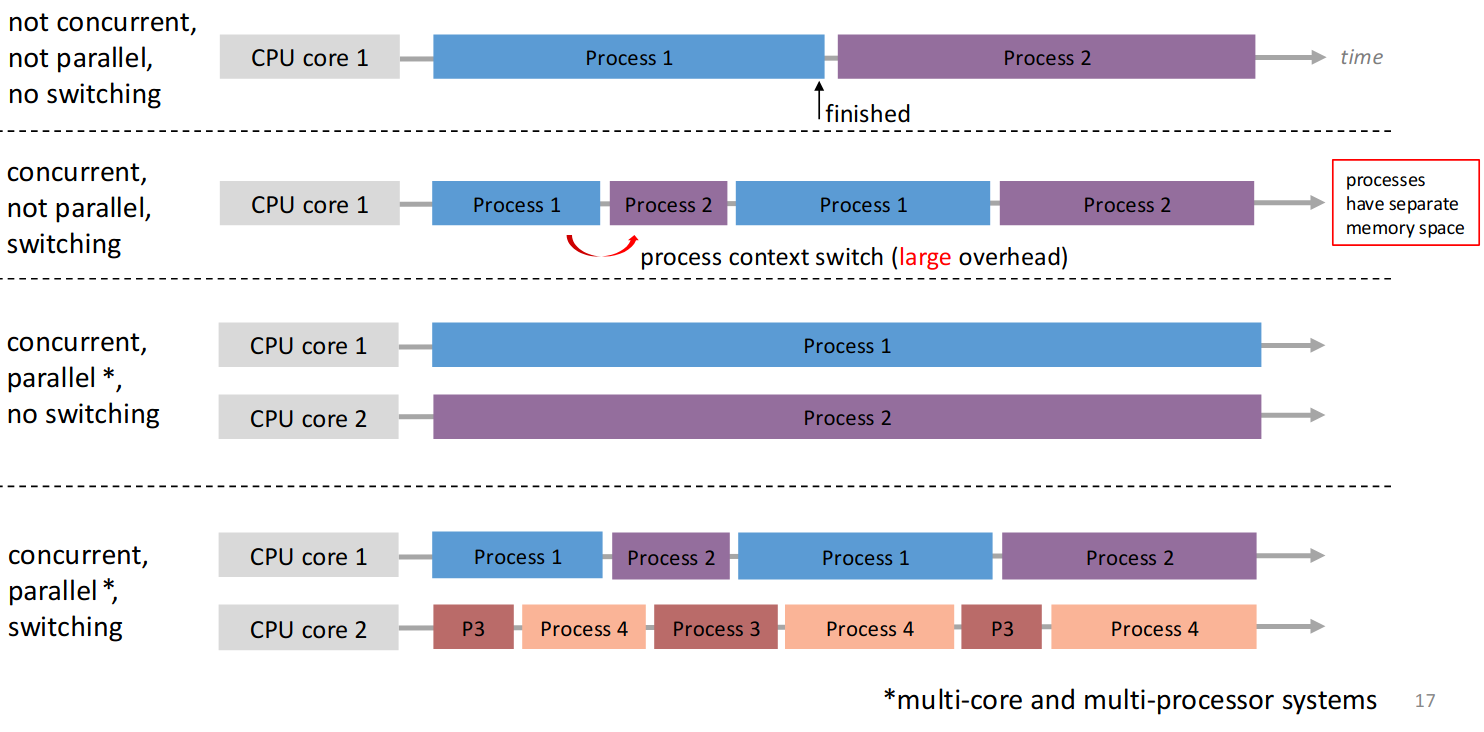
There can be more processes than CPU cores. As a single CPU can only execute one instruction at a time, only one of these processes run at the same time.

Thanks to the scheduler, we can now allow concurrency, which utilises the CPU more efficiently when there is synchronous IO for example.

Using asynchronous IO we can execute another process while one is waiting for the HDD for example. When there is an IO wait, we simply switch to the next process.
Concurrency
Multiple processes are active at the same time and make progress, though not necessarily simultaneously.
Parallelism
Multiple processes execute simultaneously on different CPU cores.
Parallelism vs. Concurrency
Parallelism implies concurrency, but concurrency does not imply parallelism.
2.2 Multithreading
Each process can have multiple user-level threads, that act as units of computation. They are managed by a user-space library!
These threads can speed up computations, make GUIs independent of the work in the backgrounds, servers can handle multiple clients, etc…
Thread
Spawned and managed by a user-space library.
They share memory and the same address space with the process.
Can communicate more easily, as ressources are shared.
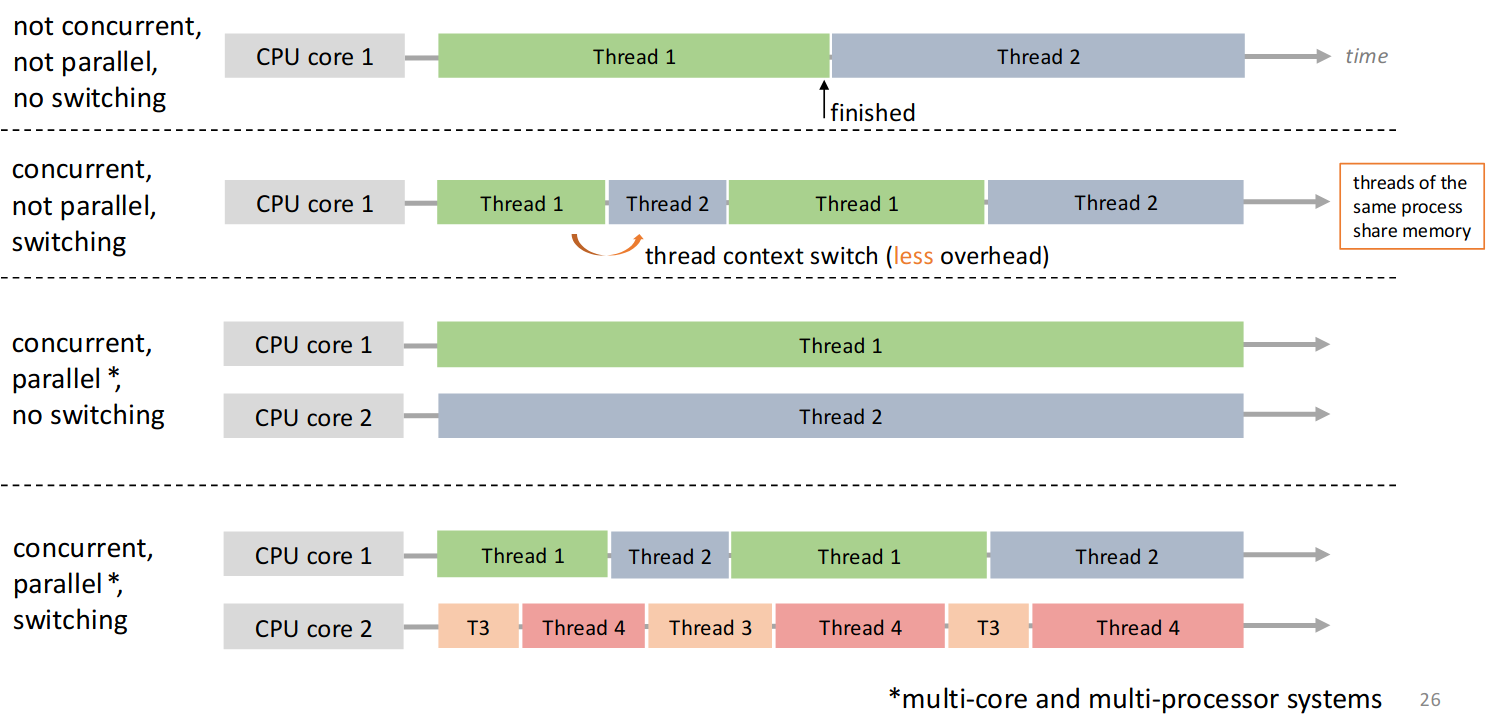
Context switching between threads is efficient! We don’t change address-space, no rescheduling and no reloading the PCB (OS state).
There are also kernel-level threads, which are scheduled by the OS on different cores. In modern Java JVMs Java threads are 1-to-1 mapped to kernel-level threads - see Thread Mapping.
CPU threads (see Hyperthreading on Intel) allows execution of threads simultaneously on physical cores - e.g. physical cores appear as 8 logical ones.
2.3 Java Threads
2.3.1 java.lang.Thread
Create a subclass of java.lang.Thread:
- override run method (must)
run()is called when execution begins- terminates when
run()returns start()invokesrun()- Calling
run()does not!! create a new Thread
class ConcurrWriter extends Thread {
	public void run() {
		// If multiple threads started -> concurrent execution
	}
}

ConcurrWriter writerThread = new ConcurrWriter();
ConcurrWriter writerThread2 = new ConcurrWriter();
writerThread.start() // have to actually start it here
writerThread2.start() // have to actually start it here
When start() is called JVM creates new stack, assigns program counter, schedules it and invokes run() on the new stack.
We then have the main thread, writerThread and writerThread2 (each with it’s own stack).
2.3.2 java.lang.Runnable (Better)
single method public void run() implements Runnable
public class ConcurrWriter implements Runnable {
	public void run() {}
}

ConcurrWriter writerTask = new ConcurrWriter();
Thread t = new Thread(writerTask); // Clear separation
Thread t2 = new Thread(writerTask); // Clear separation
t.start()
t2.start()
We then create a Thread with the Runnable Task which separates the executor and task.
IMPORTANT
- Every Java program has at least one execution thread
- the main thread
- Each call to
start()creates an actual execution thread- Program ends when all thread finish
Note that threads can continue to run even if main returns!
- Threads may execute at the same physical time on different CPU cores.
- Operations may be interleaved in many possible ways (due to scheduler)
- Different orderings are possible
- Multiple possible execution orders, may be different each time
- Execution order is non-deterministic
Interleaving
Given multiple threads, interleaving is a sequence of instructions obtained by merging the individual sequences of instructions from the threads.
Order preserved, but instructions from different Threads can appear in any sequence
2.3.3 Thread attributes
IDdenotes the unique identifier (cannot be changed)t.getId()
Namedenotes the changeable namet.setName()andt.getName()
Priority: between 1 and 10, hint to CPU schedulert.setPriority(Thread.MAX_PRIORITY)
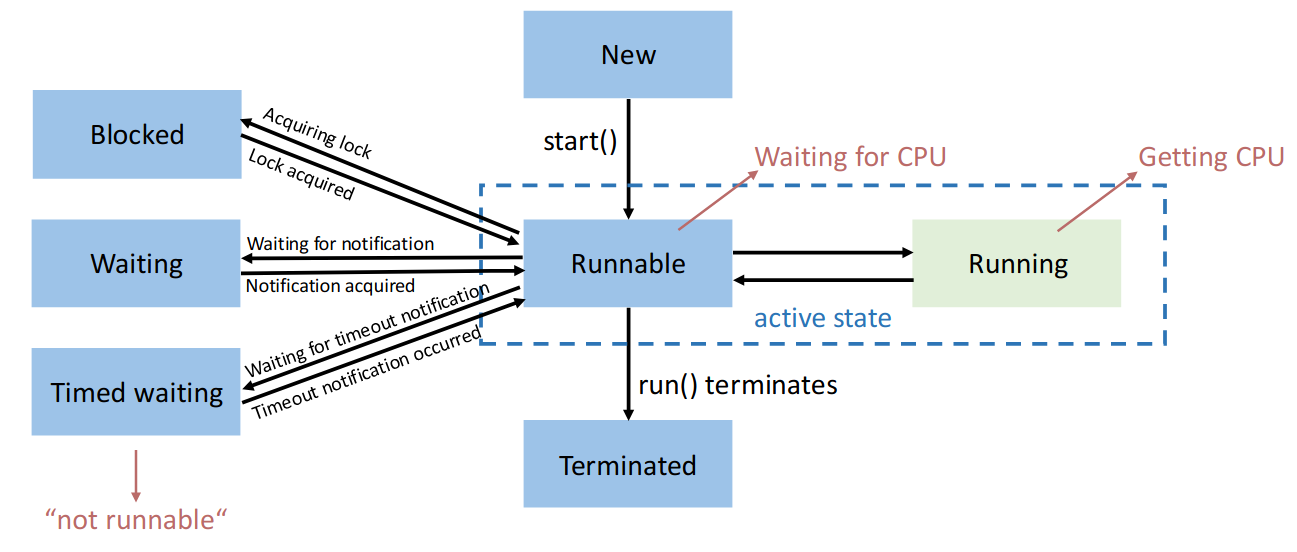
Status: denotes status a thread is int.getState()- runnable, blocked, waiting, time waiting, terminated
2.3.4 Experiment Results
- Most threads are typically blocked if they perform IO (for example
print). - High-priority threads typically finish earlier (but this is not guaranteed at all).
- Ultimately scheduler decides, priorities are only hint
2.3.5 Joining
Instead of looping in a while loop over all threads and checking their state busy waiting (this might be very ressource intensive), we can use .join() which sets the main thread to blocked until that thread has finished.
- Join (sleep, wakeup) incurs context-switch overhead
- if worker threads are short-lived, busy waiting may perform better.
2.3.6 Exceptions
Exceptions in a single-threaded program terminate the program if not caught. In a worker thread
- the exception is usually shown on the console
- the behaviour of
thread.join()is unaffected- the main thread might not be aware
Implementing the UncaughtExceptionHandler allows us to handle unchecked exceptions (which terminate the thread and need not be explicitly handled or announced, as they are unchecked).
public class ExceptionHandler implements UncaughtExceptionHandler {
	public Set<Thread> threads = new HashSet<>();

	@Override
	public void uncaughtException(Thread thread, Throwable throwable) {
	println("exception has been captured") // use thread.getName
	// and throwable.getMessage()
	}
}
ExceptionHandler handler = new ExceptionHandler();
thread.setUncaughtExceptionHanler(handler);
if (handler.threads.contains(thread)) {
// bad
} else {
// good
}2.3.7 Interrupts
The interrupt flag can be raised for a Thread, but it doesn’t need to handle it. It’s just an indicator.
We cannot just terminate a Thread directly from our program (main thread).
If a thread sleeps forever, main waits forever. With the interrupt flag we can tell it to stop: thread.interrupt() raises the InterruptedException in the thread.
However, we must implement handling in the Thread - it must catch and handle it.
The exception is thrown once on .interrupt() then the flag is immediately lowered. If not handled, this will only ever stop one instruction at a time.
Thread.sleep(1000000000L);
// .... Interrupt will stop sleep but the Thread then continues
// We need to handle with
try {
} catch (InterruptedException e) {
	// handle
}
2.4 Shared Ressources
Data Race
Erroneous program behavior caused by insufficiently synchronized accesses of a shared ressource by multiple threads, e.g., simultaneous read/write or write/write of the same memory location.
Bad Interleaving
Erroneous program behavior caused by an unfavorable execution order of a multithreaded algorithm.
Critical Section
Part of a program where shared resources are accessed by multiple threads, and only one thread should execute it at a time to prevent data races and inconsistencies.
If multiple threads are interacting in parallel with the same ressource, we need to synchronise their access to that ressource.
Otherwise a call like this.value += inc called on the same instance will produce issues. Because a bad interleaving could result in the value being loaded, then the thread being paused. This means that on resume, it operates on outdated data. (Incrementing here is not an atomic operation).
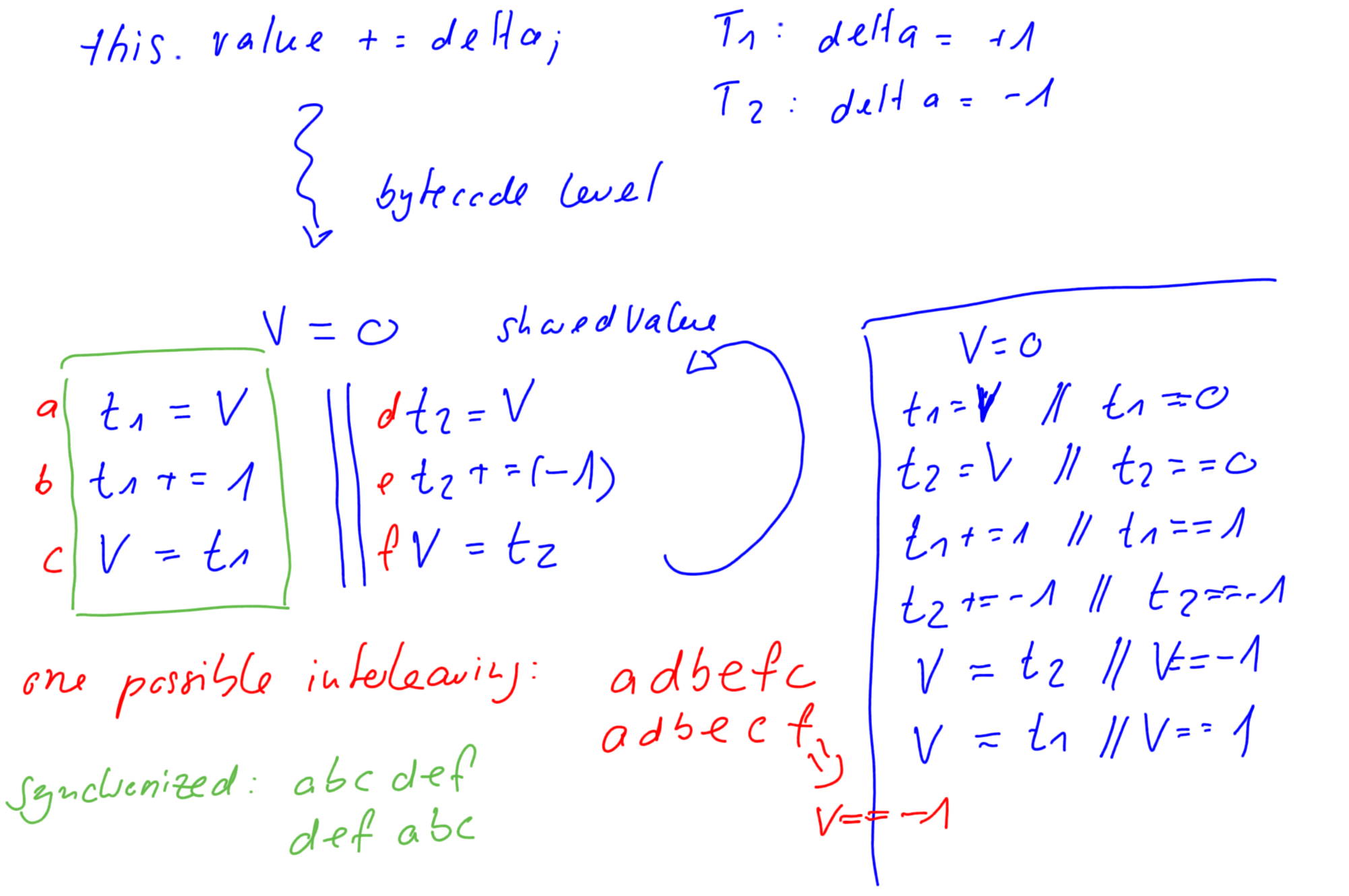
This is a case of a data race, with inc() being a critical section.
2.4.1 synchronized Keyword
Intrinsic Locks
In Java all objects have a built-in lock, called the intrinsic lock.
We can use the synchronized keyword either directly or as a method keyword.
public synchronized void inc(long delta) {
	this.value += delta;
}

public void inc(long delta) {
	synchronized (this) {
		this.value += delta;
	}
}
This grabs a lock on the provided object for the entire duration of the block: guarantees mutual exclusion.
Mutual Exclusion
Ensures that only one process or thread enters the critical section at a time, preventing data races and bad interleavings that could lead to inconsistent or incorrect program behavior.
Atomicity
In the context of synchronized, atomicity means that a critical section (protected by synchronized) is executed as an indivisible unit, preventing other threads from interrupting or seeing partial updates.
Note that 1 Thread can hold multiple Locks at the same time.
Lock on Boxed (immutable) Types
It doesn’t make sense to use
synchronized(Integer)or for any other boxed types (Long, etc…) or immutable types likeString.
This is because internally they convert to int, copy and create anew Instance!
Instead use Object lock = new Object() as a dummy lock.
When a Thread tries to acquire a lock on an instance it already has locked, this is allowed (by Java). This is called reentrant locks. This allows easy recursive function calls in an object.
public Class Foo {
	public synchronized f() { g() } // Recursive call, would lock Foo again
	public synchronized g() {  }
}
Locks on functions (Static vs. Instance)
A synchronised function that is not static will acquire a lock on the entire object.
public synchronized void increment() {
    count++;
}

// equivalent to:
public void increment() {
    synchronized (this) {
        count++;
    }
}
For a static function, we acquire a lock on the MyClass.class object which is global.
public static synchronized void increment() {
    count++;
}

// equivalent to:
public static void increment() {
    synchronized (MyClass.class) {
        count++;
    }
}
Synchronised and Exceptions
Todo
2.4.2 Wait, Notify, NotifyAll
In a producer-consumer setting we may get into a deadlock or datarace given that we are not careful when implementing the waiting logic for the consumer.
class Consumer {
	public void run() {
		while (true) {
			while (buffer.isEmpty()); // Spin until item available
			compute(buffer.remove());
		}
	}
}

class Producer {
	public void run() {
		while (true) {
			output = compute();
			buffer.add(output);
		}
	}
}
If the buffer is emptied between isEmpty() and remove(), by another thread, the .remove() call could throw an exception here (data-race).
If we add a synchronized (buffer) block around the interactions, another issue may arise.
If the consumer locks the buffer in synchronise while there are no items, the producer can never acquire the lock → endless wait.
Wait, Notify, NotifyAll
wait()releases the object lock, thread waits on internal queue (managed by the object it’s waiting for) (state becomesnot runnable)notify()wakes up an arbitrary thread waiting on the object’s monitornotifyAll()wakes up all threads
Notice that notify and notifyAll don’t actually release the lock!
These methods may only be called when we hold the lock.
Why do we need the endless loop with while (buffer.isEmpty()) wait();? There are spurious wake-ups for performance reasons which means that if there was only an if, we wouldn’t go to sleep again.
No blocking code within a synchronised method
If we have a
synchronizedon an object withing asynchronizedmethod, callingwait()only releases one lock → might lead to a deadlock.